Find what's filling your Mac.
Storage settings shows one grey bar called System Data. Macaroom names what's inside it, app by app, and tells you what's safe to clear.
Pay once · All your Macs · 7-day refund · $5 for the first 100 buyers, then $9
The real app, recorded with its built-in example data.
New in 1.2
2.8 million files in 25 seconds
Macaroom now reads many folders at once, straight from the file system, and fills in what it finds while it scans. This is the real app on our own Mac, at normal speed.
Same Mac, same folders, 2.83 million files, Full Disk Access on. Your time depends on how many files you have.
New in 1.2
Everything an app uses, in one place
An app is more than the icon in Applications. By app adds up its caches, its data and what it leaves behind, then sorts every piece by what removing it would mean.
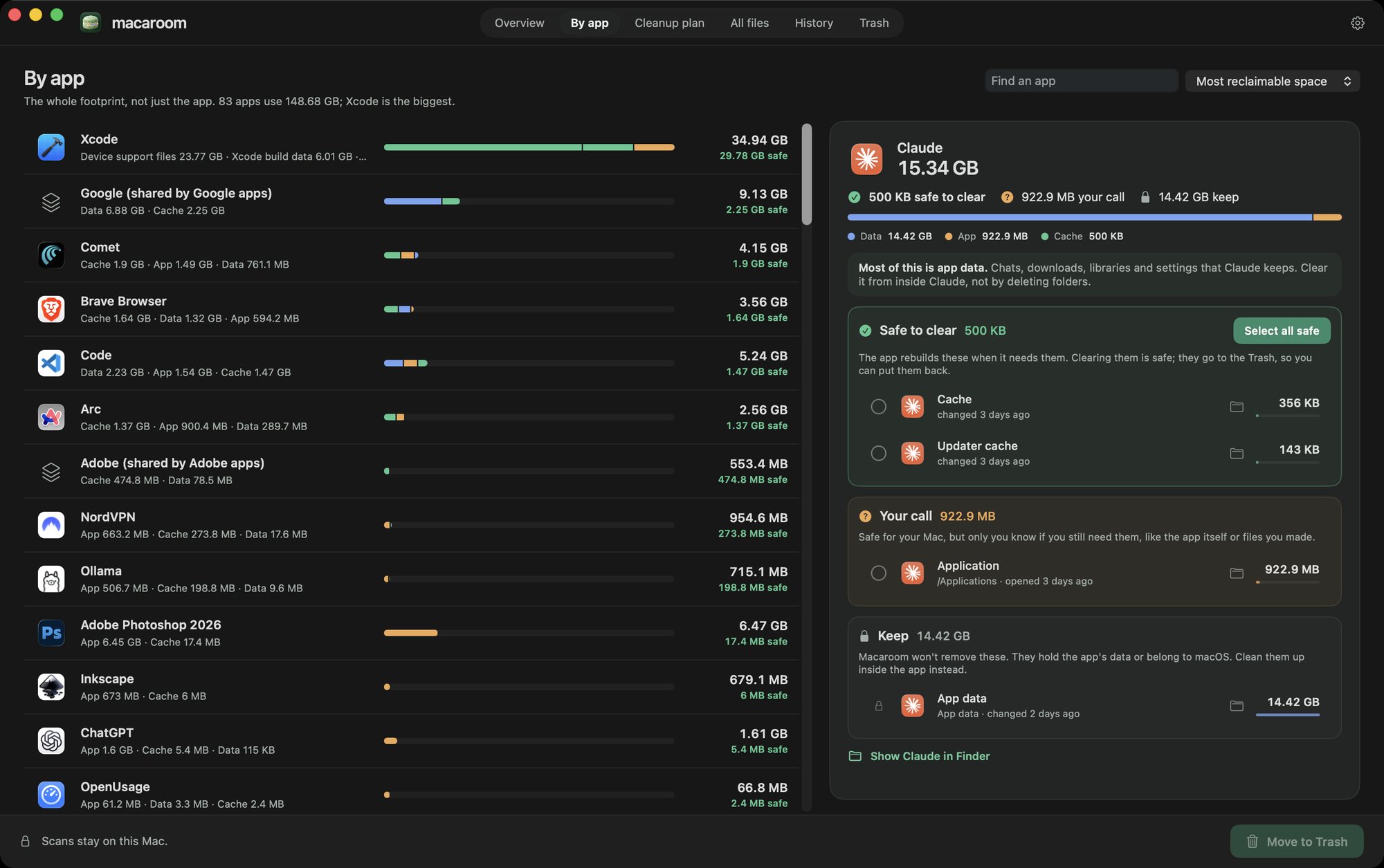
- Safe to clear. The app rebuilds it when it needs it. Select all safe items in one click.
- Your call. Fine for your Mac, but only you know if you still need it, like the app itself.
- Keep. The app's own data. Macaroom leaves it alone and tells you where to clean it up in the app.
Real screenshot. Sort by most space you can get back, by size, by name, or deleted apps first.
New in 1.2
Clear the safe stuff in one review
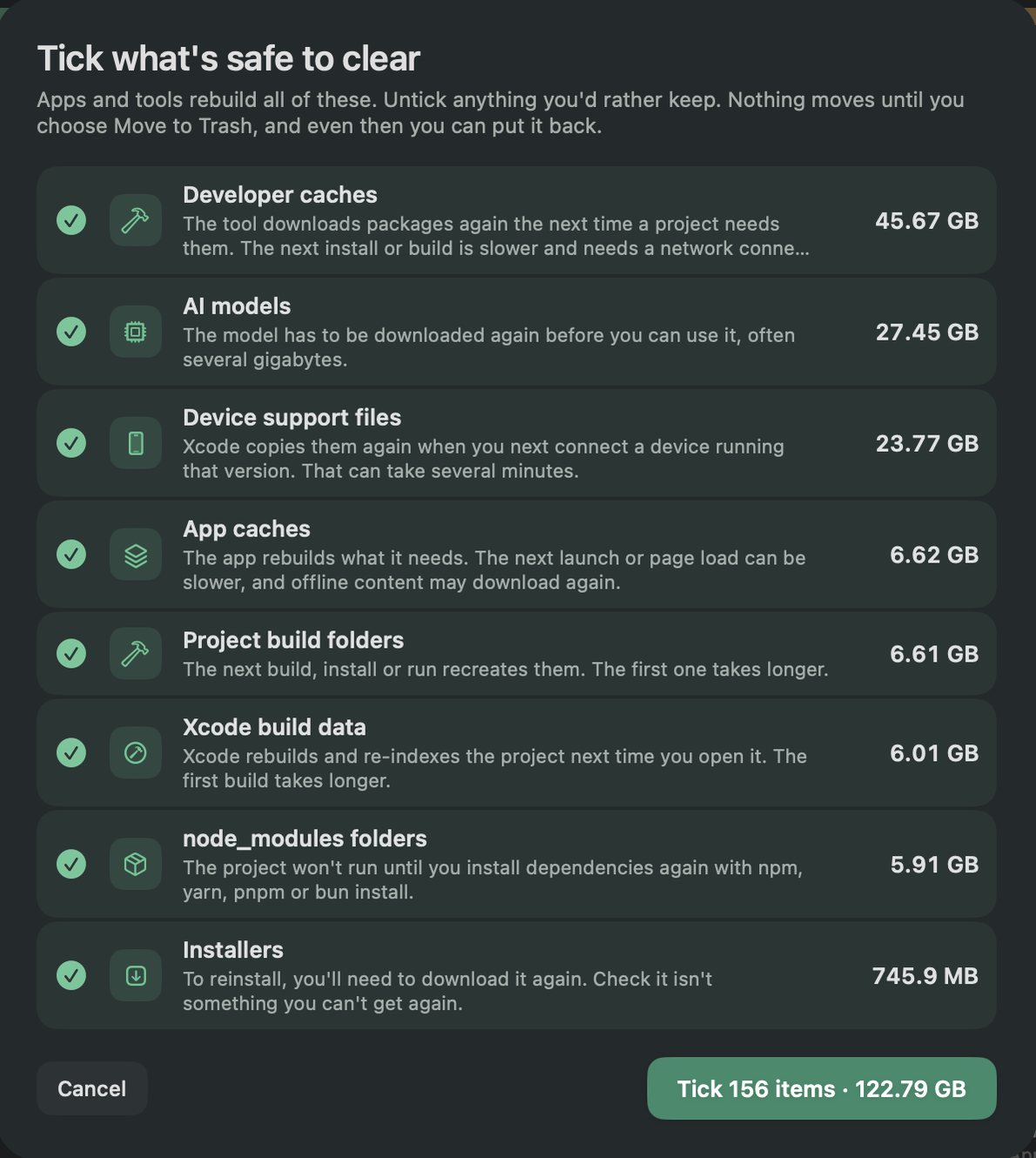
Select safe items opens a checklist of everything that apps and tools rebuild on their own, each with what clearing it costs you: a slower first build, or a model to download again.
Untick anything you'd rather keep. Nothing moves until you choose Move to Trash, and you can put it all back.
New in 1.2
Fewer mystery folders
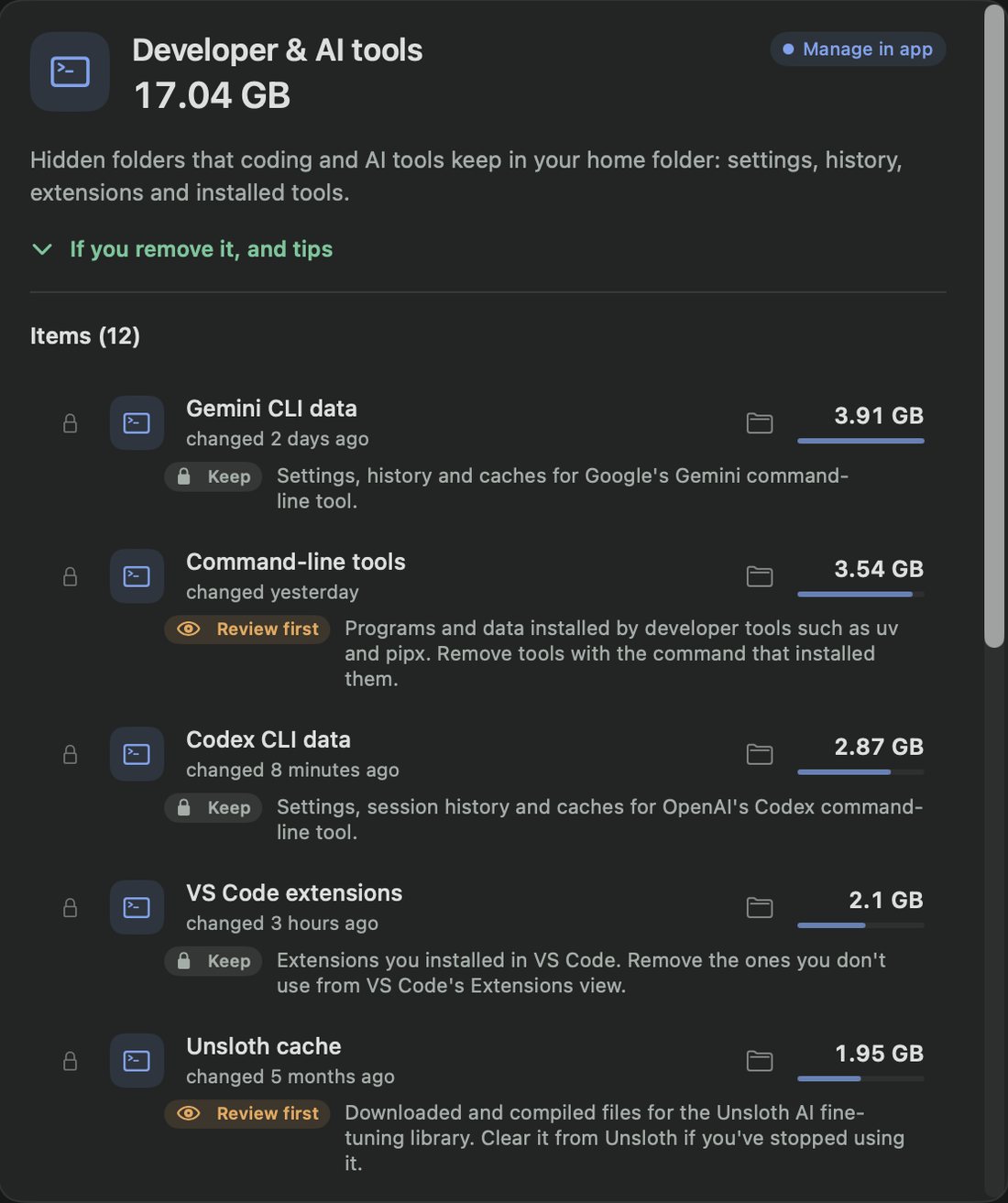
The hidden folders that coding and AI tools leave in your home folder now have plain names, like Gemini CLI data, Codex CLI data and VS Code extensions, with a note on whether to keep each one. What each folder is.
Left as Unclassified on our Mac, down from 27.6 GB in 1.1. What's left is grouped by where it lives, so you can still judge it.
In your menu bar
A heads-up before space runs out
Macaroom sits in your menu bar. Every scan is compared with the one before, so you can see what grew, roughly when the disk will be full, and what you could clear today.
- Free space in the menu bar: optional, beside the macaron, updated every minute.
- Worth a look: the few things that changed since last time, each with a button to deal with it.
- Weekly check: an optional scan once a week in the background.
- Two alerts: one when you drop below 10% free, and one when free space falls by 10 GB or more in about a day.
- 30-day chart: free space over the last month, in History.
For developers
Keep the code. Clear the build files.
Old projects leave gigabytes of generated folders behind. Macaroom finds them, checks when you last changed each project, and flags the ones you haven't touched in months.
- Node.js
- Rust
- Swift
- Python
- Xcode
- Gradle
- CocoaPods
- Next.js
A folder only counts when the project's own files confirm what it is. Clearing removes the generated folder, and the next build or install brings it back.
Your source code stays.
What's actually in System Data
Storage settings shows one grey bar. Here is the same example Mac, sorted by what put each gigabyte there. Click a row to open it in the demo, or read what System Data is and what's safe to clear.
Try it right here
This is the app's interface running on example data. Open a source, tick a few things, move them to the Trash, then put them back. Nothing on your Mac is touched.
Storage settings vs. Macaroom
Storage settings is fine for a quick total. Macaroom shows what's behind each number and what clearing it would do. Drag the handle: the left side is what Storage settings shows for an example Mac, the right side is what Macaroom shows for the same disk.
| Storage settings | Macaroom | |
|---|---|---|
| What you see | About a dozen categories, often one large System Data total | Around 30 named sources, by the app or tool that made them |
| App caches | Counted inside System Data | Listed app by app |
| One app's whole footprint | The app only, under Applications | The app, its caches, data and leftovers together |
| Leftovers from deleted apps | Not shown | Found and named |
| What removing it does | Not explained | Explained for each source before you pick |
| Open apps | Not checked | Won't clear a cache while its app is open |
| Old projects | Counted inside Documents or Developer | Build folders found, with when you last worked on each project |
| Before you run out | A warning once the disk is nearly full | A weekly check, and alerts at 10% free or when space drops fast, if you turn them on |
| Undo | Depends on the category | Everything goes to Trash, with one-click restore |
| Price | Included with macOS | $5 once during the launch, then $9 |
Macaroom measures files itself, so its totals won't match Apple's to the gigabyte. For Photos, Messages and iCloud, it points you to the right setting instead of touching them.
Every source says what you'd lose
Size doesn't tell you whether something is safe to delete. So each source comes with what it is, what happens if you clear it, and whether Macaroom can do it for you.
Caches that apps rebuild are marked Rebuildable. Your own files are marked Personal data. Things an app manages, like Photos or Messages, stay with that app, and Macaroom shows you the setting that cleans them properly.
0.0 GB moved to Trash
3 moved, 1 skipped because Chrome was openEverything goes to the Trash first
Macaroom never picks things for you. It moves what you choose to the Trash, and only deletes it for good if you ask.
- You pick. Tick what you're done with, then check the plan, grouped by what removing each thing means.
- It double-checks. Right before moving anything, Macaroom makes sure each item is still the one it scanned, and skips anything whose app is open.
- You can undo it. The Trash tab lists everything Macaroom moved, and one click puts it back.
Your files stay on your Mac
A storage app sees every file name on your Mac, including your projects and downloads. Macaroom keeps all of it on the Mac.
No account
You get a license key after checkout. There's nothing to sign up for or sign in to.
No analytics
Macaroom doesn't report what it finds, what you clear or how you use it.
Two checks online
One looks for updates, the other checks your license. Scans never leave your Mac, and everything works offline.
A few more things
Old downloads, with previews
Files you haven't opened in months, shown as thumbnails, so you can spot what to keep at a glance.
Worth a look
Each scan is compared with the last: what grew, when the disk fills up, and what you can clear now.
Menu bar and alerts
Free space beside the macaron, an optional weekly check, and a heads-up before you run low or when space drops fast.
Untouched projects
Build folders and dependencies from projects you haven't worked on in months.
Installers and updates
Old disk images in Downloads, and iPhone update files you won't need again.
A proper Mac app
Built in SwiftUI, with keyboard shortcuts, light and dark mode, and a menu bar panel.
Know what's safe to clear.
One payment. All your Macs.

Macaroom for Mac
LAUNCH PRICEOne-time payment. No subscription.
Instant download + license
Apple Pay or card · Secure checkout with Stripe
- One license for all your Macs
- Every feature + Macaroom 1 updates
- 7-day money-back guarantee
macOS 14+ · Apple silicon & Intel · 8 MB · Notarised by Apple
Common questions
Something else? Email [email protected] and you'll hear back from the person who makes Macaroom.
Could Macaroom delete something important?
It only moves what you select, and only to the Trash. Photos, Mail, Messages, app data and anything it can't identify can't be selected at all. Right before moving, it checks each item is still the one it scanned and that its app isn't open. Anything moved can be put back from the Trash tab.
Why don't Macaroom's numbers match Storage settings?
Macaroom measures every file itself and groups it by the app or tool that made it. macOS uses its own categories and counts some things, like local snapshots, differently. The point is to find what's taking space, not to match Apple's number exactly.
Why does it ask for Full Disk Access?
macOS hides Messages, Mail and device backups from every app unless you allow Full Disk Access. Macaroom works without it and tells you what it couldn't see. With it, Macaroom still reads only file names, sizes and dates.
Does Macaroom run in the background?
Only if you turn on the weekly check. Macaroom then scans your Mac again once a week while it sits in the menu bar with its window closed, and tells you what changed. Otherwise it scans only when you ask.
How long does a scan take?
On our Mac, 2.8 million files take about 25 seconds with Full Disk Access on. Fewer files means a faster scan. Results fill in while it runs, and you can stop at any time to see what it found so far.
Will I get the space back straight away?
Not until you empty the Trash. Macaroom shows free space before and after, so you can see what actually changed.
Is there a free trial?
The demo above is the app's real interface with example data, so you can try every screen first. If it's not right for you after buying, email within 7 days for a full refund.
How do I get the app after paying?
Stripe handles checkout. The next page shows your license key and starts the download, and the key is emailed to you too. Open Macaroom.dmg, drag Macaroom into Applications, open it and paste your key.
Do I pay again for updates?
No. Every update to Macaroom 1 is included in the one payment, and updates install from inside the app.
Do I need a license key?
Yes. You get one straight after checkout and by email. Paste it into Macaroom once on each Mac; the same key works on all your Macs, up to 10. The example data works without one, so you can look around first.
How do I get help or a refund?
Email [email protected]. Refunds are available within 7 days of purchase.
Does Macaroom send anything about my files anywhere?
No. Your scans, file names and project names stay on your Mac. Macaroom goes online only to check for updates and to check your license.
Why isn't it on the Mac App Store?
App Store apps are sandboxed, so they can only look inside folders you pick one at a time. Macaroom needs to measure your whole home folder and Library to find what's taking space. It's signed and notarised by Apple instead.
Which Macs does it run on?
Macs with Apple silicon or Intel, running macOS 14 Sonoma or later.